 Transcriber
Your best ideas have terrible timing. They arrive while you're driving, cooking, carrying groceries, walking the dog, or elbow-deep in a project — every situation where typing into a phone is somewhere between annoying and dangerous. Voice memo apps promise to help, but they cheat: they record audio, and audio is a graveyard. Nobody re-listens to forty voice memos; the idea is technically saved and practically lost.
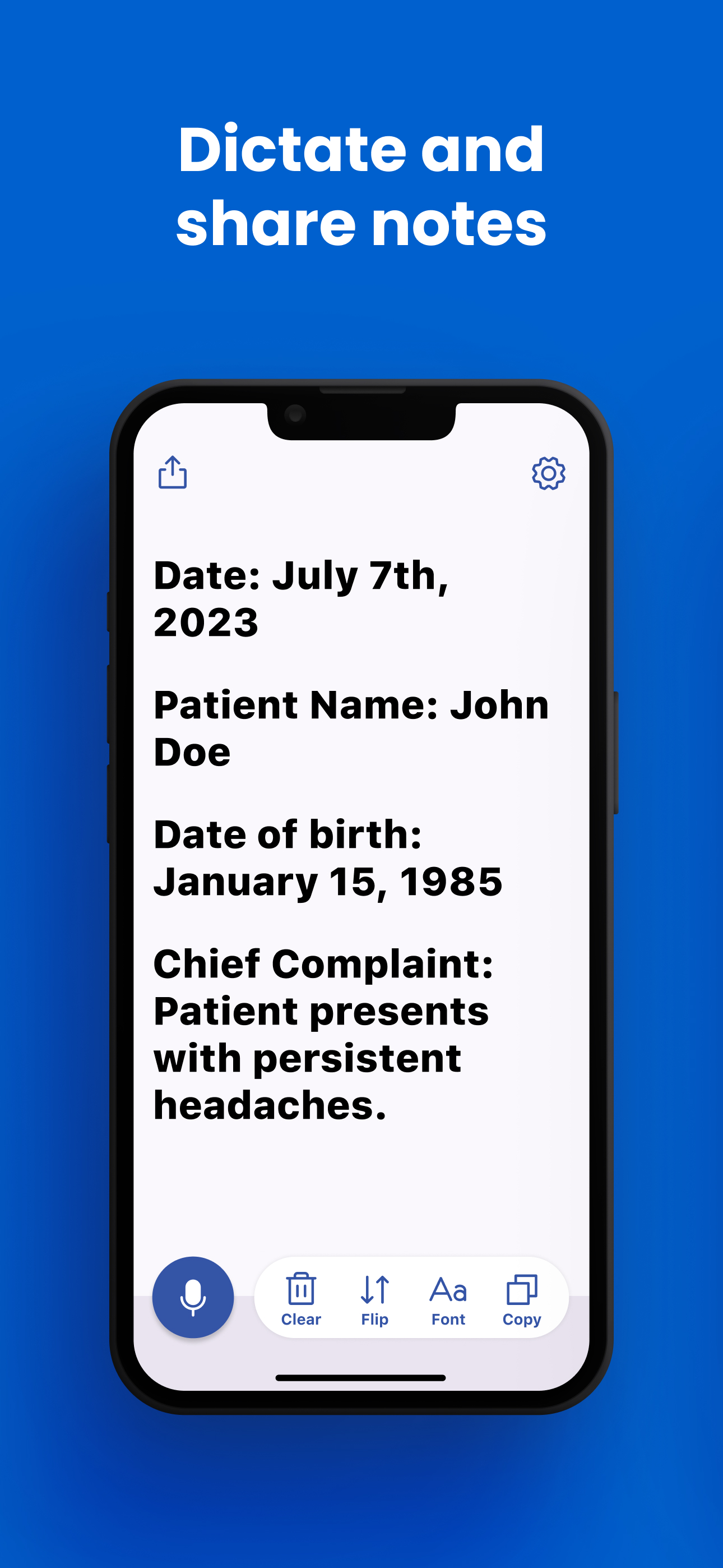
Hands-free note taking done right means speech becomes text immediately — searchable, copyable, pasteable text you'll actually use. That's what Transcriber's Notes mode does: talk naturally, watch the words appear, then send them wherever your notes live. Doctors dictate patient notes with it, students capture lectures, and everyone else finally empties their head without stopping what they're doing. Here's how to make it your default capture tool.
What Is Hands-Free Note Taking?
Hands-free note taking is capturing thoughts by voice with no typing and no post-processing debt. The critical distinction is between the two ways apps handle your voice:
- Record-first apps (voice memos) store audio you must replay or transcribe later. Capture is easy; retrieval is where it dies.
- Transcribe-first apps like Transcriber convert speech to text as you speak. The note is finished the moment you stop talking — readable at a glance, searchable, and ready to paste into Notes, email, a to-do app, or a document.
Transcriber adds three things that make the transcribe-first approach dependable: recognition runs on-device, so dictation works in the car with no signal and private thoughts stay private; it's real-time, so you can see the note forming and fix a mishearing instantly; and it supports 50+ languages, so your notes can be in whatever language you think in.
How to Use Transcriber for Voice Notes
- Get the app. Download Transcriber free from the App Store. It runs on iPhone, iPad, Mac (Apple Silicon), and Vision Pro — the same tool at your desk and on the move.
- Open Notes mode. This is the dictation-focused view, built for composing text rather than following a conversation.
- Tap the mic and just talk. Speak in normal sentences — punctuation is handled for you. Capture is continuous, so you can think out loud, pause, and continue without touching the phone.
- Glance to verify, don't stop to edit. The live transcript lets you confirm the note is landing correctly. Resist polishing mid-flow; get the thought out, tidy later if needed.
- Copy or share the finished note. One tap copies everything; Share sends it to Apple Notes, Mail, Messages, Reminders, or any app on your phone. Your transcribed text plugs into whatever system you already use.
- Build the capture habit. Meeting debriefs on the walk back to your desk, shopping lists while cooking, lecture summaries on the bus, journal entries at night. When capture costs nothing, you capture everything.
Students: pair Notes mode for your own summaries with live transcription during lectures — our live captioning guide covers the lecture workflow. Professionals with confidentiality requirements should note that no audio ever leaves the phone; that's why doctors use Transcriber for patient notes.
Tips for Best Results
- Speak in complete sentences. Natural sentence rhythm gives the cleanest punctuation and structure.
- Say the structure out loud. Dictating "First… Second… Third…" produces a note that's already organized.
- Keep sessions topical. One note per topic beats one giant stream — easier to file, easier to find.
- Ship the note immediately. Copy it to its destination right after dictating, while context is fresh.
- Use it in your strongest language. With 50+ languages available, dictate in whichever language the thought arrives in.
Frequently Asked Questions
Built-in keyboard dictation is designed for short bursts inside text fields and times out quickly. Transcriber is built for sustained, hands-free capture: continuous listening, a large readable live transcript, one-tap copy of the whole note, offline operation, and 50+ languages.
Yes — start Notes mode before you drive, and capture is fully hands-free from there. As always, set up the phone before moving and keep your attention on the road.
Completely. Speech recognition runs on the device, so notes work on planes, trails, and dead zones — and nothing you dictate is ever uploaded.
Wherever you want them. Copy puts the text on your clipboard; Share sends it to Apple Notes, Mail, Messages, Reminders, or any other app. Transcriber feeds your existing system rather than trapping notes in its own silo.
Free to download and start using. Unlimited note-taking and all features come with Pro at $9.99/month or $49.99/year — the yearly plan saves about 58%.
Download Transcriber Free
Real-time speech to text in 50+ languages. Free to start on iPhone, iPad, Mac, and Apple Vision Pro.
Download on the App Store